
MovieBox for iPhone: Can You Use MovieBox on iOS?
For the Android version discussed here, see the current Movie Box Mod APK download page.
If you are looking for MovieBox for iPhone, the current Android MovieBox APK provided on this site cannot be installed directly on an iPhone or iPad.
The file is an Android .apk, while iOS uses a different application format and installation system. Renaming an APK, transferring it to an iPhone, or opening it from the Files app will not convert it into an iOS application.
We currently do not provide a verified MovieBox IPA file for iPhone, so this page will not give you an unverified iOS download.
Can You Install MovieBox APK on an iPhone?
 Can You Install MovieBox APK on an iPhone?
The normal MovieBox APK installation process applies to Android devices, not iOS.
No. The MovieBox file currently used on this site is built as an Android APK.
Android and iOS use different application formats, installation systems, signing requirements, and operating environments. An iPhone does not treat an .apk file as an installable iOS application.
Downloading the MovieBox APK through Safari, saving it in Files, sending it through AirDrop, or changing the filename extension does not make the Android package compatible with iOS.
What Happens If You Download the MovieBox APK on iPhone?
 What Happens If You Download the MovieBox APK on iPhone?
You can download an .apk file through Safari or save one inside the Files app, but iOS will not treat that file as an installable iPhone application.
The file may remain visible in Downloads or Files, but tapping it does not turn it into an iOS app.
That is because the problem is not where the file is stored. The package itself was built for Android.
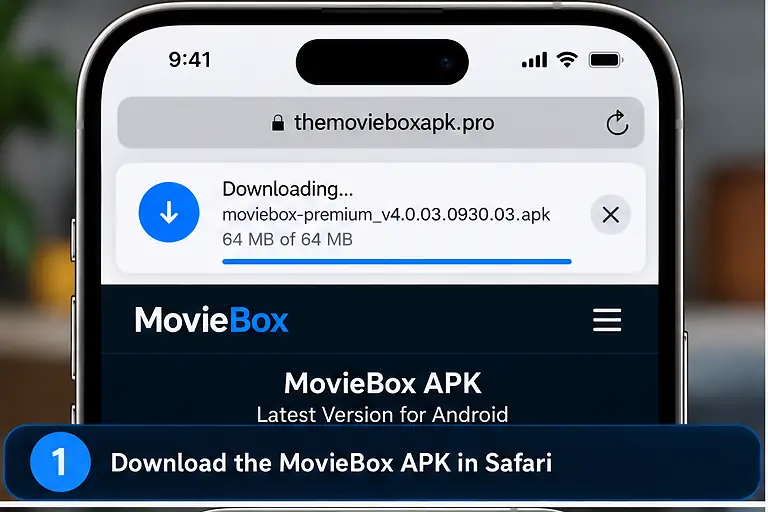
So this process does not work:
- download the MovieBox APK in Safari
- save it to Files
- tap the APK
- expect an iPhone installation screen
The file can exist on the iPhone without being compatible with iOS.
APK vs IPA: Why the File Type Matters
 APK vs IPA: Why the File Type Matters
| Android | iPhone / iPad |
|---|---|
| APK application package | iOS application package |
| Designed for Android | Designed for iOS / iPadOS |
| Installed in an Android environment | Must use Apple’s iOS installation environment |
| Current MovieBox file is APK | Current APK cannot run directly |
Apple’s development tools use .ipa package archives for iOS application distribution outside normal App Store installation workflows. An Android APK is a different package and cannot simply be substituted for an IPA.
Can You Convert MovieBox APK to IPA?
Not by simply changing the filename or using a basic file-conversion tool.
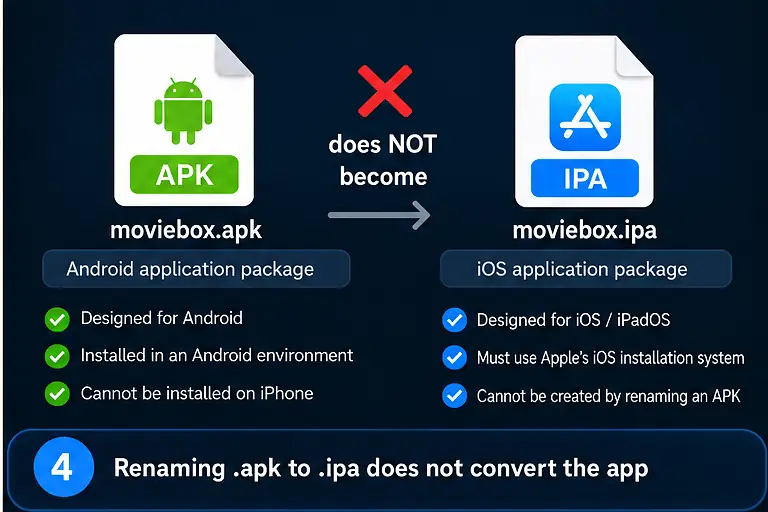
An APK and an iOS application package contain software built for different operating systems, frameworks, signing systems, and runtime environments.
moviebox.apk
does NOT become
moviebox.ipaby renaming the extension.
A genuine iPhone version would need to be created as an iOS application by its developer rather than converted by changing the file extension.
Is There a MovieBox App in the Apple App Store?
 Is There a MovieBox App in the Apple App Store?
Searching the App Store can show applications with MovieBox or similar names.
That does not automatically mean those apps are the same MovieBox application available as the Android APK on this site.
App Store listings currently exist under similar names from different developers and describe different functions, including trailer browsing and local video-library management. Because of that, users should check the developer, description, and functionality instead of assuming that matching branding means it is the same app.
We are not linking those apps as an official iOS version of the Android MovieBox build.
Should You Download a Random MovieBox IPA?
 Should You Download a Random MovieBox IPA?
Be careful with websites claiming to provide a MovieBox IPA when the source and developer cannot be verified.
Some current third-party pages claim that an iOS or IPA version exists, while other MovieBox-related sites state that there is no native iOS build. Those conflicting claims are exactly why this site will not present an unverified IPA as an official MovieBox download.
An IPA file also does not become trustworthy merely because a website labels it “MovieBox for iOS.”
Does Apple’s Alternative App Distribution Make the APK Work?
No.
Apple now supports alternative app distribution in certain regions, including Brazil, Japan, and the European Union, but those systems still distribute iOS applications. They do not make Android APK files compatible with an iPhone.
The issue is not simply whether Apple allows installation outside the App Store. The current MovieBox file itself was built for Android.
Can Jailbreaking Make the Android APK Work on iPhone?
Jailbreaking changes some restrictions on an iPhone, but it does not automatically make Android applications compatible with iOS.
The MovieBox APK is still an Android package after an iPhone is jailbroken.
Because of that, jailbreaking should not be presented as a method for installing the Android MovieBox APK.
This site does not recommend jailbreaking an iPhone just to try to run this APK.
Can You Use an Android Emulator on iPhone?
The emulator approach described for Windows is covered separately in the Movie Box Mod for PC guide.
The situation is different from Windows.
On a Windows PC, an Android emulator can create an Android environment where the MovieBox APK runs. On a normal iPhone, users do not have the same straightforward Android-emulator setup available for installing and running arbitrary Android APK files.
For ordinary iPhone use, you should not expect an Android APK to work through an emulator in the same way it does on a Windows PC.
That means the PC emulator method should not be copied and presented as an iPhone installation method.
How to Check a Claimed MovieBox iPhone Version
 How to Check a Claimed MovieBox iPhone Version
If you find a website or app claiming to offer MovieBox for iPhone, verify what it actually is before installing anything.
- whether the developer can be identified
- whether the source explains if it is an iOS app, web app, or something else
- whether the app is connected to the same MovieBox product you are looking for
- whether the installation method matches normal iOS distribution
- whether the site provides a real version history
- whether it asks you to install an unknown configuration profile
- whether it makes unrealistic claims such as converting an Android APK directly into an iPhone app
A matching name or logo is not enough to prove that an iPhone app is the same MovieBox product.
Be Careful With Configuration Profiles and Certificates
 Be Careful With Configuration Profiles and Certificates
Some third-party iPhone download pages may ask users to install a configuration profile, enterprise certificate, or other device-management component before an app can be opened.
Do not approve those prompts simply because the page uses the MovieBox name.
Before installing any profile or certificate, you should understand who issued it and why it is required.
A profile can affect device settings or permissions, so it should not be treated like an ordinary APK download.
This page will not instruct users to install an unknown profile just to obtain an unverified MovieBox iOS version.
What Can You Do If You Want MovieBox on an iPhone?
 What Can You Do If You Want MovieBox on an iPhone?
At the moment, the Android APK used on this site is not the correct file for an iPhone.
If you are choosing another Android-based device, the Movie Box TV Mod APK guide covers compatible television hardware.
The important point is to use software made for the operating system you actually have rather than forcing an Android package onto an iPhone.
What to Do If You Already Downloaded the MovieBox APK on iPhone
If the MovieBox APK is already saved in Safari Downloads or the Files app, you do not need to keep trying to open it.
The file is still an Android application package and iOS will not install it as an iPhone app.
- delete the APK if you do not need the file
- keep it only if you plan to transfer it later to a compatible Android device or computer
- avoid installing profiles or certificates from another site just because the APK itself did not open
- look for a separately verified iOS version rather than trying to force the Android file to install
Deleting the APK from the iPhone does not affect any Android installation you may have on another device.
Why MovieBox APK Does Not Open From the Files App
The Files app can store many file types that iOS cannot execute as applications.
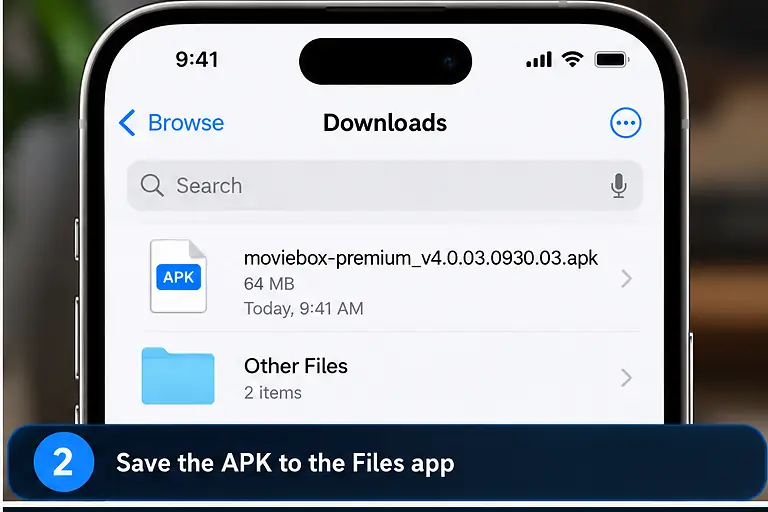
Seeing moviebox-premium_v4.0.03.0930.03.apk inside Files only means the file was downloaded or transferred successfully.
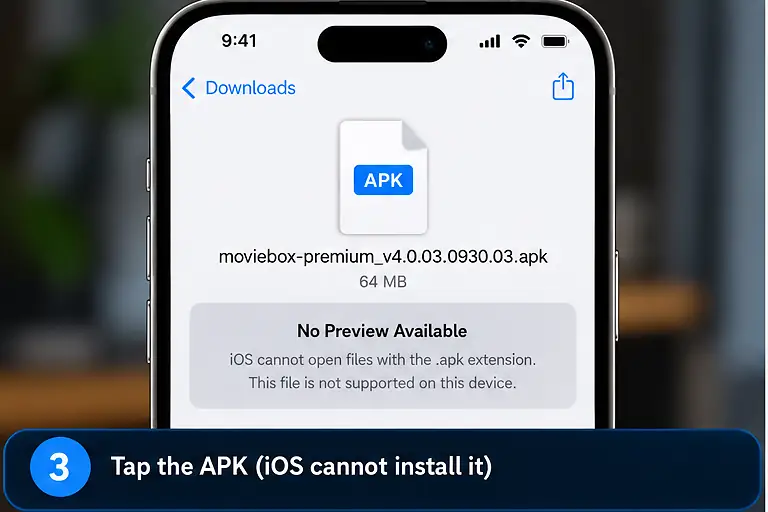
It does not mean iOS recognizes the APK as an installable application.
The same principle applies to email attachments, cloud storage, AirDrop transfers, and files copied from a computer. Moving the APK onto the iPhone does not change the operating system it was built for.
MovieBox on Android vs iPhone
| Android | iPhone / iPad | |
|---|---|---|
| Current MovieBox file | APK | APK is not compatible |
| Direct installation | APK can be installed in Android | Android APK cannot be installed as an iOS app |
| Package environment | Android | iOS / iPadOS |
| Current file provided here | Compatible Android build | No verified iOS build provided |
| Renaming file extension | Does not change compatibility | Does not convert APK to IPA |
| Emulator method | Android environment already present | No equivalent normal APK installation method |
The difference is primarily the operating system and application package, not the device screen size or whether the file can be downloaded.
Can You Use MovieBox in Safari on iPhone?
An Android APK does not run inside Safari.
A website can provide its own browser-based service, but that is separate from installing or running the MovieBox Android APK.
This site does not currently present an unverified third-party website as an official browser version of the Android MovieBox application.
If you encounter a website claiming to be “MovieBox for iPhone,” check what service it actually provides before entering account information or installing anything.
Does AirDrop Make MovieBox APK Compatible With iPhone?
No.
AirDrop can transfer a file from another Apple device or computer, but transferring the APK does not change the file itself.
The MovieBox APK remains an Android application package after it reaches the iPhone.
AirDrop is a transfer method, not an application-conversion system.
Frequently Asked Questions
 Frequently Asked Questions
Can I download MovieBox on iPhone?
You can physically download an APK file to an iPhone, but the Android APK provided on this site cannot be installed as an iOS application.
Is MovieBox APK compatible with iOS?
No. The current MovieBox file used on this site is an Android APK and is not an iOS application package.
Can I change MovieBox APK to IPA?
Changing the filename from .apk to .ipa does not convert the application. A genuine iOS version would need to be built for iOS.
Why is MovieBox APK visible in Files but not installing?
The Files app can store unsupported file types. Seeing the APK there only confirms that the file exists on the device, not that iOS can install it.
Can I install MovieBox with Safari?
Safari can download files, but it cannot turn the Android MovieBox APK into an iOS application.
Will jailbreaking let me install the MovieBox APK?
Jailbreaking does not automatically make Android APK files compatible with iOS. The APK remains an Android package.
Is a MovieBox app in the App Store the same application?
Not necessarily. Similar names can be used by unrelated apps. Check the developer, description, and functionality before assuming an App Store listing is the same MovieBox product.
Is there a verified MovieBox IPA on this site?
No. This site currently does not provide a verified MovieBox IPA file for iPhone or iPad.
Conclusion
The current MovieBox download used on this site is an Android APK and cannot be installed directly on an iPhone or iPad.
Downloading the file through Safari, saving it in Files, transferring it with AirDrop, renaming it to .ipa, or jailbreaking the device does not convert the Android application into an iOS app.
Until a verifiable iOS version can be confirmed, it is better to avoid unverified IPA files, unknown configuration profiles, and websites that claim the Android APK can be installed directly on an iPhone.